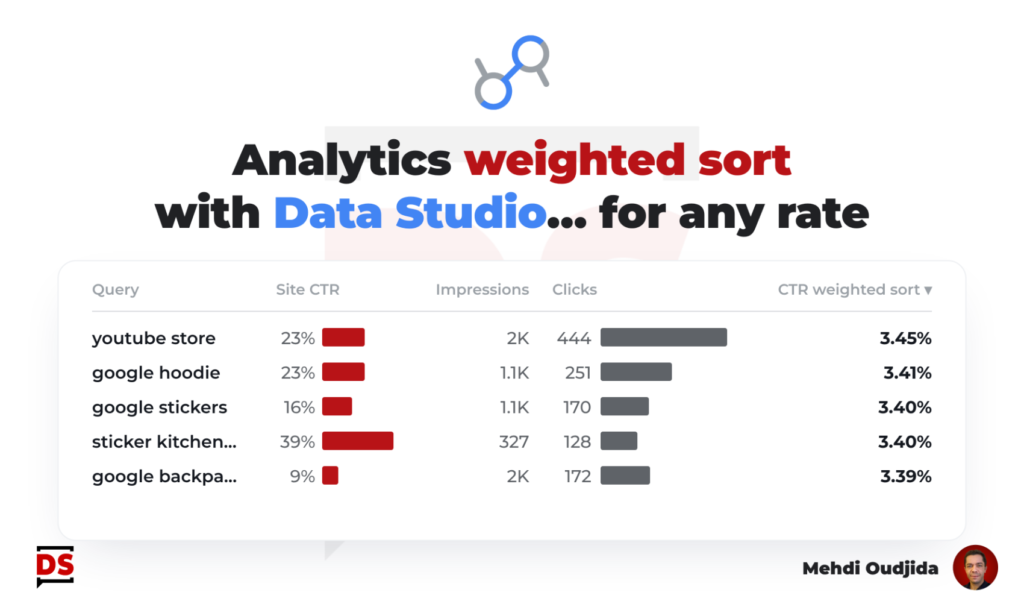
Weighted sort was a nice feature from Google Universal Analytics table charts. Adjusting the sorting to inject the importance of the quantity represented by each row helped a lot, applied to rates.
If you sort by descending order a list of dimension values by conversion rate, you don’t want to see as the first row, one session with one conversion…100%…And it is the same for any rate, in any data context. Injecting a weight is a smart idea.
Inspirations and credits 🥷
Inspired by Avinash Kaushik and Dr Pete, Yehoshua Coren has written few years ago a nice article describing how implementing a weighted sort for bounce rate inside BigQuery and how to display it in a Data Studio report: Weighted Sorting in Google Data Studio using BigQuery
I’m fortunate to work with Yehoshua (and all the amazing elites team around him…I’m lucky…), and so, It is my turn to be inspired by my peers, and the article of the analytics ninja, after discussions about some specific client needs.
I’ve transposed this already designed formula directly inside Data Studio with some tricks. So it allows to get a weighted sort regardless of the data source! You will see, it is quite easy. Ready? Go!
Unlock free access to the full article
Access to this article written by Mehdi Oudjida, Data Studio Expert, is completely free: enter your email address to receive an access link to the full article.
Your email address is only used to send the link, and for the newsletter if you tick the box. It is not stored on this site.