
The starter pack to set up a Data Studio report with your GA4Dataform data. There’s no better way to start sharing the data collected in Google Analytics and exported to BigQuery.
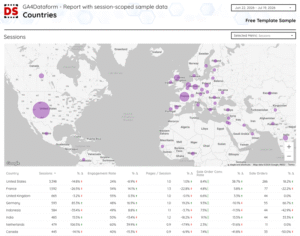
Price: Free
About this Data Studio template
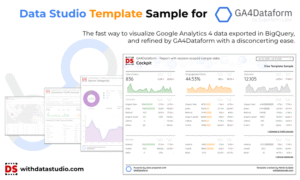
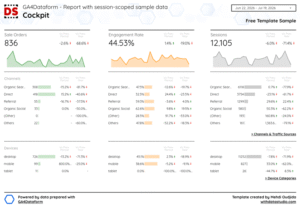
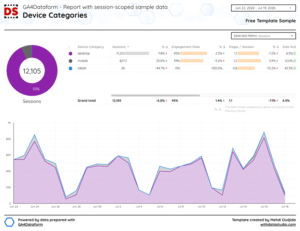
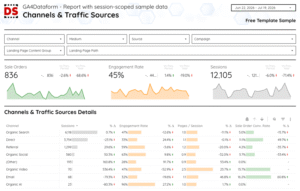
This Data Studio template is a sort of starter pack to report the GA4Dataform data.
It connects to the demo_daily_sessions_report output table generated by GA4Dataform. This table contains aggregated session data, including metrics such as sessions, engaged sessions, revenue, and page views.
This is therefore just an example template. It’s up to you to enrich your Dataform workspace, take advantage of GA4Dataform updates, create reporting tables tailored to your needs, and use them as data sources in Data Studio.
The data used in this Data Studio template is sample data. To use the template with your own GA4 data, you’ll need to connect it to your BigQuery project where GA4Dataform has processed your GA4 export (with prefix ‘superform_outputs_’). You will find in it the same “demo_daily_sessions_report” table.
A documentation will be provided after ordering the template to help you for the installation.
What is GA4Dataform
GA4Dataform is a free solution that simplifies the process of transforming raw GA4 data in BigQuery into actionable insights.
It offers pre-built SQL models that generate user-friendly tables, such as the session aggregation table shown in the Data Studio template. This eliminates the need for manual data cleaning and transformation, saving users days, weeks, or even months of work. GA4Dataform transform your raw GA4 event data into actionable insights with industry-leading, enterprise-level efficiency and precision. Designed for digital analysts, technical marketers, data teams, and developers.
How GA4Dataform works
GA4Dataform leverages Google Cloud Dataform to create a streamlined workflow. It automatically:
- Connects to your Google Analytics 4 (GA4) BigQuery export: GA4Dataform accesses the raw event data exported from your GA4 property.
- Applies pre-built SQL models: These models transform the raw data into organized tables, including sessions, users, and transactions.
- Generates user-friendly tables: The output tables are optimized for analysis and reporting, making it easy to extract valuable insights.
Benefits of using GA4Dataform
- Saves time and resources: Eliminates the need for manual data processing, freeing up your team for other tasks.
- Reduces errors: Pre-built models ensure data accuracy and consistency.
- Improves efficiency: Streamlines the data analysis process, allowing for faster insights generation.
- Enhances data accessibility: Makes GA4 data more accessible to analysts and business users.
My thoughts on GA4Dataform
I’m not going to describe to you how complicated it can be to reliably transform & prepare Google Analytics 4data from the BigQuery export for activation and reporting.
I’m also not going to tell you how happy I was to discover the GA4Dataform project during Superweek 2024 event, submitted for the Golden Punchcard Contest.
And finally, I’m not going to explain how much I respect the work of the 5 data experts behind this project, two of whom I have the chance to work with every week Jules Stuifbergen and Simon Breton.
Well, I kind of just did…
I had the pleasure of beta testing this solution, and I was amazed by the simplicity of the one-click installation, the actions the software performs automatically, and the ready-to-use pipeline it generates within GCP. Such automation, such packaging, it’s honestly mind-blowing.
And I’m not even talking about the configuration details of the model, the elegance of the code in Dataform, and the professional documentation written notably by Krisztián Korpa.
I really should stop saying I’m not talking about what I’m talking about…
So, naturally, when I started discussing with the Superform Labs talented creators, with Artem Korneev, then with Johan van de Werken, about what could be designed in Data Studio to display these refined data, I wanted to contribute by initially providing something to quickly visualize this data.
That’s how the free template we’re offering today was born.
A sort of starter pack based on one of the demo tables generated by GA4Dataform.
If you’ve deployed the solution & scheduled the daily data refreshes in Dataform, the table is already ready in your BigQuery dataset. If that’s not the case, it’s an opportunity to activate the BigQuery export of GA4 data and test GA4Dataform.
Once again, this is just a sample template. Up to you to enrich your Dataform workspace, take advantage of GA4Dataform updates, create reporting tables specific to your needs, and use them as data sources in Data Studio.
And for me, this is just a small first contribution. I’ll soon propose premium templates for GA4Dataform. Exacting answers for reporting, complementary to exacting answers for data engineering and warehousing.
GA4Dataform is a major analytics contribution to the community and its creators made very well what they announced with ambitions.
