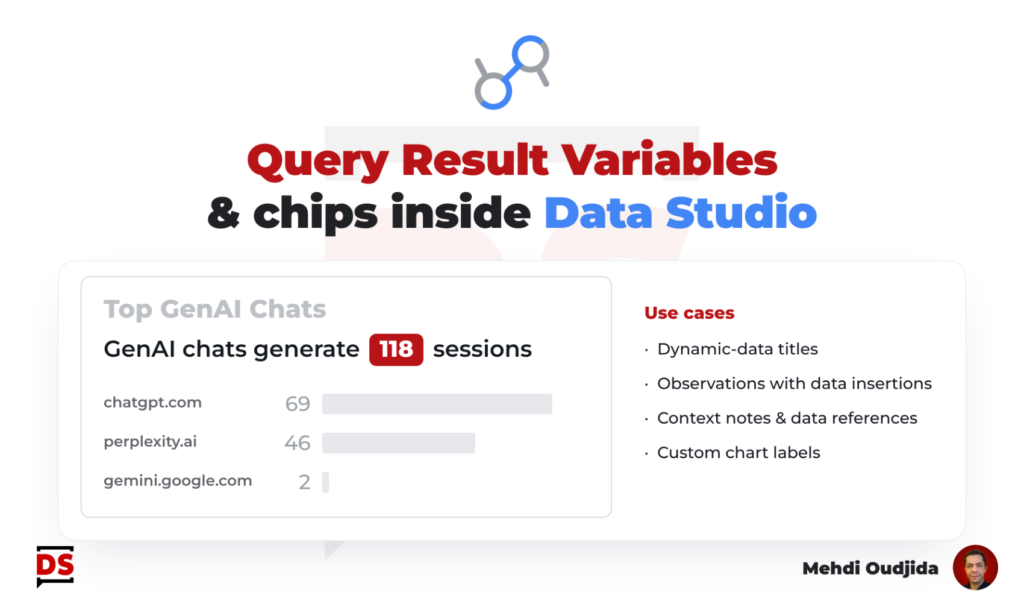
Let’s discover “Query Result Variables” or “Chips” inside Data Studio, a freshly released feature at the same time than 2 other important additions (responsive layouts & modern charts).
Definition and use cases
Query Result Variables are insertions of dynamic data in your text elements. You can take advantage of these variables for a lot of use cases:
- Creating a McKinsey title highlighting dynamic data as a chart title
- Building a descriptive text combining several observations with the related dynamic data
- Decorating a chart with a specific data label without creating a single-row table chart, like we have to do before
- Commenting the data displayed in a dashboard in a side note to provide contexts for specific numbers of dimensions values
- …
Technically, Query Result Variables are stored at the report level, like text elements, but dependent to a single data source.
Unlock free access to the full article
Access to this article written by Mehdi Oudjida, Data Studio Expert, is completely free: enter your email address to receive an access link to the full article.
Your email address is only used to send the link, and for the newsletter if you tick the box. It is not stored on this site.